Showing posts with label Indexing. Show all posts

Friday, 3 June 2016

Endeca | Expression Record Manipulator

In Endeca record manipulators are used to change the data associated with record during indexing. 
There are 3 types of manipulators available.

1. Perl Manipulators
2. Java Manipulators
3. Record (Expression) Manipulators

Here we will learn how to configure  Record (Expression) Manipulators.

Below are the steps to configure Record (Expression) Manipulators.

1. Open Endeca project in developer studio.
2. Right Click on pipeline editor select New then Record followed by Manipulator.


 3. In Pop up box enter record manipulator name and record source details.


4.  Double click on newly created manipulator. You will see the below expression editor window.


Now create the expressions as per requirement. Below is the example of expression to create new property based on the value of existing property.

Below algorithm used in this example expression.
if value of Dep_ID property is 123
    then create new property named Location with value Delhi
else if value of Dep_ID property is 456
    then create new property named Location with value Bangalore
else
    then create new property named Location with value Pune 

====================================================================
<EXPRESSION LABEL="" NAME="IF" TYPE="VOID" URL="">

  <EXPRESSION LABEL="" NAME="MATH" TYPE="INTEGER" URL="">
    <EXPRNODE NAME="TYPE" VALUE="STRING"/>
    <EXPRNODE NAME="OPERATOR" VALUE="EQUAL"/>
    <EXPRESSION LABEL="" NAME="IDENTITY" TYPE="PROPERTY" URL="">
      <EXPRNODE NAME="PROP_NAME" VALUE="Dep_ID"/>
    </EXPRESSION>
    <EXPRESSION LABEL="" NAME="CONST" TYPE="INTEGER" URL="">
      <EXPRNODE NAME="VALUE" VALUE="123"/>
    </EXPRESSION>
  </EXPRESSION>

  <EXPRESSION LABEL="" NAME="CREATE" TYPE="VOID" URL="">
    <EXPRNODE NAME="PROP_NAME" VALUE="Location"/>
    <EXPRESSION LABEL="" NAME="CONST" TYPE="STRING" URL="">
      <EXPRNODE NAME="VALUE" VALUE="Delhi"/>
    </EXPRESSION>
  </EXPRESSION>

  <EXPRNODE NAME="ELSE_IF" VALUE=""/>

  <EXPRESSION LABEL="" NAME="MATH" TYPE="INTEGER" URL="">
    <EXPRNODE NAME="TYPE" VALUE="STRING"/>
    <EXPRNODE NAME="OPERATOR" VALUE="EQUAL"/>
    <EXPRESSION LABEL="" NAME="IDENTITY" TYPE="PROPERTY" URL="">
      <EXPRNODE NAME="PROP_NAME" VALUE="Dep_ID"/>
    </EXPRESSION>
    <EXPRESSION LABEL="" NAME="CONST" TYPE="INTEGER" URL="">
      <EXPRNODE NAME="VALUE" VALUE="456"/>
    </EXPRESSION>
  </EXPRESSION>

  <EXPRESSION LABEL="" NAME="CREATE" TYPE="VOID" URL="">
    <EXPRNODE NAME="PROP_NAME" VALUE="Location"/>
    <EXPRESSION LABEL="" NAME="CONST" TYPE="STRING" URL="">
      <EXPRNODE NAME="VALUE" VALUE="Bangalore"/>
    </EXPRESSION>
  </EXPRESSION>

  <EXPRNODE NAME="ELSE" VALUE=""/>

  <EXPRESSION LABEL="" NAME="CREATE" TYPE="VOID" URL="">
    <EXPRNODE NAME="PROP_NAME" VALUE="Location"/>
    <EXPRESSION LABEL="" NAME="CONST" TYPE="STRING" URL="">
      <EXPRNODE NAME="VALUE" VALUE="Pune"/>
    </EXPRESSION>
  </EXPRESSION>

</EXPRESSION>

=====================================================================

5. Edit other pipeline component to use this manipulator as record source.


6. Save the Endeca project and run the baseline. Below is the example data indexed using configuration.


Wednesday, 18 May 2016

MDEX | Revert Endeca Index to Particular Baseline

Follow below steps to revert\restore MDEX indexes to previous baseline update.

1. Stop the MDEX Engine.
2. Clean up dgraph_input and sub directories [Delete the content].
3. Copy the previous backup indexes from dgidx_output.<YYYY_MM_DD.HH_MM_SS> to dgraph_input directory.
4. Start the MDEX Engine. MDEX Engine reads the files in dgraph_input and its sub directories.

Here is the example.

1. Old baseline data

Old Indexed Data

2. Latest indexed data

Latest Indexed Data


3. Restore the old indexed data using above steps


Sunday, 24 January 2016

Endeca Implementing a Custom Java Record Manipulator

Follow below steps to write and configure custom java record manipulator.

1.   Write java manipulator using CADK (Content Adapter Development Kit) API classes.
2.   Compile this java manipulator into a JAR file.
3.   Configure manipulator in Forge pipeline.

Below is the example of simple java manipulator.
This record manipulator is doing two tasks.

1. Converting/updating one record property to lower case.
2. Adding one new record property.

=========================================================================
 package com.test.endeca.manipulator;

import com.endeca.edf.adapter.Adapter;
import com.endeca.edf.adapter.AdapterConfig;
import com.endeca.edf.adapter.AdapterException;
import com.endeca.edf.adapter.AdapterHandler;
import com.endeca.edf.adapter.PVal;
import com.endeca.edf.adapter.Record;

public class SimpleJavaManipulator implements Adapter {

    private static final String PASSTHROUGH_SOURCEPROP = "SOURCEPROP";
    private static final String PASSTHROUGH_TARGETPROP = "TARGETPROP";
  

    @Override
    public void execute(AdapterConfig adapterConfig, AdapterHandler adapterHandler)
            throws AdapterException {       
        String sourceprop = adapterConfig.first(PASSTHROUGH_SOURCEPROP);
        String targetprop = adapterConfig.first(PASSTHROUGH_TARGETPROP);
      
        if (sourceprop == null)
            throw new AdapterException(PASSTHROUGH_SOURCEPROP + " passthrough not specified");

        if (targetprop == null)
            throw new AdapterException(PASSTHROUGH_TARGETPROP + " passthrough not specified");
       
        for (int inp = 0; inp != adapterHandler.getNumInputs(); inp++)
        {          
            boolean hasMoreRecords = true;
            long currentRecord = 0;
          
            while(hasMoreRecords)
            {
       
               Record rec = adapterHandler.getRecord(inp);
               if (rec != null)
                {
                    ++currentRecord;
                    String sourcepropValue = null;
                   
                      for (PVal prop : rec)
                      {
                          if (prop.getName().equals(sourceprop))
                          {
                               sourcepropValue = prop.getValue();
                              // update current property to lower case
                              prop.setValue(sourcepropValue.toLowerCase());
                              break;
                          }
                       }
                    // Add new property
                    if (sourcepropValue != null)  {
                        rec.add(new PVal(targetprop,sourcepropValue));                                               
                    }                  
                    adapterHandler.emit(rec);
                } else {
                    hasMoreRecords = false;
                }
            }
        }      
    }

}
=========================================================================

Note : CADK API jar is available at %ENDECA_ROOT%\cadk\lib (adapter.jar).

Once manipulator is implemented and compiled into jar, now configure this manipulator into forge pipeline.
Steps to Configure java manipulator into forge pipeline.

1. Open Endeca application pipeline in developer studio.
2. Right Click then select New then Java Manipulator.


3. In manipulator pop up add general information like java home, manipulator class name and path of the manipulator compiled jar.


4. Add data sources.


5. Add Pass Throughs.


6. Add manipulator as data source in next pipeline component.


7. Now your manipulator is ready. Save the pipeline and run the baseline.

Friday, 8 January 2016

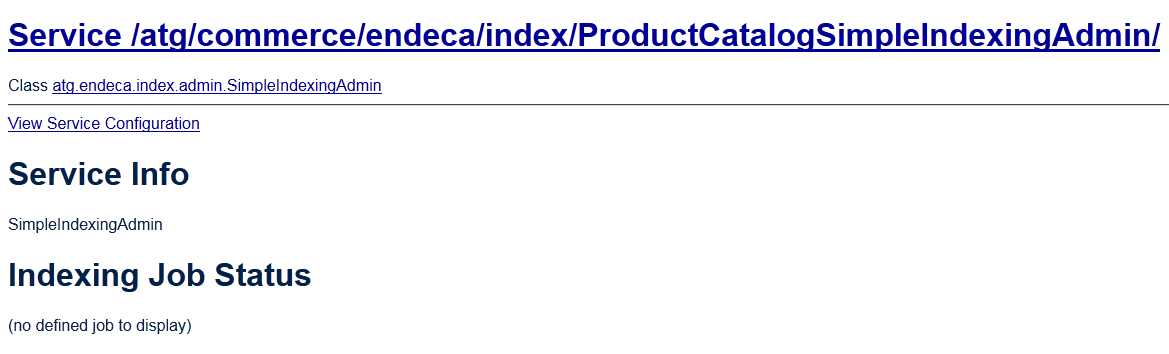
ProductCatalogSimpleIndexingAdmin component indexing phases and indexing buttons are missing

Sometimes when you are working on indexing related components. You may face this issue. In this case ProductCatalogSimpleIndexingAdmin component UI is looks like normal ATG component [indexing phases and indexing buttons are missing].

Below is the screen capture of erroneous ProductCatalogSimpleIndexingAdmin UI.


Root Cause : This happens when any one of the component listed in phaseToPrioritiesAndTasks is not able initialize/start.

Solution : Make sure that there is no error in all components in phaseToPrioritiesAndTasks .

After fixing issue here is the expected UI.


Sunday, 13 December 2015

Use xslt to Index xml File into Endeca

Here is the small example with steps to use xslt while indexing xml file into Endeca. 

1. First of all configure xml file in Record Adapter of pipeline. 


2. Then click on Transformer tab.


Here configure below two fields.

a. Type : The file format of the transformation style sheet.The only valid value is XSLT.
b. URL :  Specifies the location of the .xsl file. The path is either an absolute path or a path relative to the location of the Pipeline.epx file. In this example transform.xsl file is located at the location of the pipeline.epx file.

In this example xslt is used to convert name to uppercase.
------------------------------------------------------------------------------------------------------------------------
 transform.xsl
------------------------------------------------------------------------------------------------------------------------
 <?xml version="1.0" encoding="UTF-8"?>
<xsl:stylesheet  xmlns:xsl="http://www.w3.org/1999/XSL/Transform" version="1.0">
<xsl:variable name="smallcase" select="'abcdefghijklmnopqrstuvwxyz'" />
<xsl:variable name="uppercase" select="'ABCDEFGHIJKLMNOPQRSTUVWXYZ'" />
<xsl:template match="/">
<RECORDS>
<xsl:for-each select="employees/employee">
    <RECORD>
         <PROP NAME="P_Age">
             <PVAL><xsl:value-of select="age"/></PVAL>
          </PROP>
          <PROP NAME="P_Name">
             <PVAL><xsl:value-of select="translate(name, $smallcase, $uppercase)"/></PVAL>
          </PROP>
          <PROP NAME="Dep_ID">
             <PVAL><xsl:value-of select="depid"/></PVAL>
          </PROP>
    </RECORD>
</xsl:for-each>
</RECORDS>
</xsl:template>
</xsl:stylesheet>
 ------------------------------------------------------------------------------------------------------------------------

 ------------------------------------------------------------------------------------------------------------------------
Sample input xml file (data.xml)
 ------------------------------------------------------------------------------------------------------------------------
 <?xml version="1.0" encoding="UTF-8"?>
<employees>
   <employee>
      <name>Jon</name>
      <age>20</age>
      <depid>123</depid>
   </employee>
   <employee>
      <name>Ban</name>
      <age>30</age>
      <depid>456</depid>
   </employee>
   <employee>
      <name>Kim</name>
      <age>40</age>
      <depid>789</depid>
   </employee>
</employees>
 ------------------------------------------------------------------------------------------------------------------------
3. Run baseline indexing and see the resutls in jspref.


Sunday, 21 June 2015

ATG-Endeca indexing reduce logging messages to avoid terminal lock up (Hang/Not responding)

While indexing newly configured application, JBoss terminal hanged. It was not responding at all. The issue was due to high volume of log messages during indexing. Here is solution.........


Explaining the fix for Weblogic , JBoss and IBM WebSphere.

1.   Oracle WebLogic Server

Create a WebLogic filter in $WL_HOME/../user_projects/domains/base-domain-name/config/config.xml.
<log-filter>
  <name>CXFFilter</name>
  <filter-expression>
  ((SUBSYSTEM = org.apache.cxf.interceptor.LoggingOutInterceptor') OR
  (SUBSYSTEM = 'org.apache.cxf.interceptor.LoggingInInterceptor')) AND
  (SEVERITY = 'WARNING')
  </filter-expression>
</log-filter>
In the same file, add configuration to apply the filter. The following example applies the filter to the server log file and to standard output for a server instance named Prod.
<server>
   <name>Prod</name>
   <log>
     <log-file-filter>CXFFilter</log-file-filter>
     <stdout-filter>CXFFilter</stdout-filter>
     <memory-buffer-severity>Debug</memory-buffer-severity>
   </log>
   <listen-port>7103</listen-port>
   <web-server>
     <web-server-log>
       <number-of-files-limited>false</number-of-files-limited>
     </web-server-log>
   </web-server>
   <listen-address></listen-address>
 </server>

 2.   JBoss Enterprise Application Platform

Add the following to jboss-as\server\server-name\conf\jboss-log4j.xml:
<category name="org.apache.cxf.interceptor.LoggingInInterceptor">
  <priority value="WARN"/>
</category>
<category name="org.apache.cxf.interceptor.LoggingOutInterceptor">
  <priority value="WARN"/>
</category>

3.   IBM WebSphere Application Server

Edit the server.xml of the WebSphere application server instance ($WAS_HOME/profiles/AppSrv/config/cells/HostCell/nodes/HostNode/servers/Server/server.xml).
In the traceservice:TraceService tag, add these strings, separated by colons, to the startupTraceSpecification property:
org.apache.cxf.interceptor.LoggingInInterceptor=warning
org.apache.cxf.interceptor.LoggingOutInterceptor=warning
For example
<services xmi:type="traceservice:TraceService"
  xmi:id="TraceService_131/2495363666"
  enable="true" startupTraceSpecification=
  "*=info:org.apache.cxf.interceptor.LoggingInInterceptor=warning:
  org.apache.cxf.interceptor.LoggingOutInterceptor=warning"
  traceOutputType="SPECIFIED_FILE" traceFormat="BASIC">
    <traceLog xmi:id="TraceLog_1312495363666"
      fileName="${SERVER_LOG_ROOT}/trace.log" rolloverSize="20"
      maxNumberOfBackupFiles="5"/>
</services>

Note  : I tried this for JBoss 5.1.0, this is working well. This is very helpful to reduce logging during development (low configuration machine).

Saturday, 13 June 2015

Resolving 'ConfigurationGeneratorForge' failed Issue

Endeca baseline indexing failed for newly created application. 


Here is the baseline error detail.

=======================================================================

C:\Endeca\apps\Store\control>baseline_update.bat
[06.13.15 19:35:25] INFO: Checking definition from AppConfig.xml against existing EAC provisioning.
[06.13.15 19:35:26] INFO: Updating provisioning for component 'ConfigurationGeneratorForge'.
[06.13.15 19:35:26] INFO: Updating definition for component 'ConfigurationGeneratorForge'.
[06.13.15 19:35:27] INFO: Updating provisioning for component 'Forge'.
[06.13.15 19:35:27] INFO: Updating definition for component 'Forge'.
[06.13.15 19:35:27] INFO: Updating provisioning for component 'PartialForge'.
[06.13.15 19:35:27] INFO: Updating definition for component 'PartialForge'.
[06.13.15 19:35:27] INFO: Definition updated.
[06.13.15 19:35:27] INFO: Starting baseline update script.
[06.13.15 19:35:27] INFO: Acquired lock 'update_lock'.
[06.13.15 19:35:27] INFO: [ITLHost] Starting shell utility 'cleanDir_processing'.
[06.13.15 19:35:29] INFO: [ITLHost] Starting shell utility 'cleanDir_forge-output'.
[06.13.15 19:35:30] INFO: [ITLHost] Starting shell utility 'cleanDir_dgidx-output'.
[06.13.15 19:35:31] INFO: [ITLHost] Starting shell utility 'move_-_to_processing'.
[06.13.15 19:35:32] INFO: [ITLHost] Starting copy utility 'fetch_config_to_input_for_forge_Forge'.
[06.13.15 19:35:34] INFO: [ITLHost] Starting backup utility 'backup_log_dir_for_component_ConfigurationGeneratorForge'.
[06.13.15 19:35:35] INFO: [ITLHost] Starting component 'ConfigurationGeneratorForge'.
[06.13.15 19:35:45] SEVERE: Batch component  'ConfigurationGeneratorForge' failed. Refer to component logs in C:\Endeca\apps\Store\config\script\..\..\.\logs\forges\ConfigurationGeneratorForge on host ITLHost.
Occurred while executing line 20 of valid BeanShell script:
[[

17|
18|        // Generate instance configuration
19|        ConfigurationGeneratorForge.archiveLogDir();
20|        ConfigurationGeneratorForge.run();
21|
22|        // archive logs and run ITL
23|        Forge.archiveLogDir();

]]

[06.13.15 19:35:45] SEVERE: Caught an exception while invoking method 'run' on object 'BaselineUpdate'. Releasing locks.

Caused by java.lang.reflect.InvocationTargetException
sun.reflect.NativeMethodAccessorImpl invoke0 - null
Caused by com.endeca.soleng.eac.toolkit.exception.AppControlException
com.endeca.soleng.eac.toolkit.script.Script runBeanShellScript - Error executing valid BeanShell script.
Caused by com.endeca.soleng.eac.toolkit.exception.EacComponentControlException
com.endeca.soleng.eac.toolkit.component.BatchComponent run - Batch component  'ConfigurationGeneratorForge' failed. Refer to component logs in C:\Endeca\apps\Store\config\script\..\..\.\logs\forges\ConfigurationGeneratorForge on host ITLHost.

[06.13.15 19:35:45] INFO: Released lock 'update_lock'.

C:\Endeca\apps\Store\control>


=======================================================================

Here is stack trace from ConfigurationGeneratorForge.start.log

=======================================================================

INFO    06/13/15 14:05:38.432 UTC (1434204338431)    FORGE    {config}: (AdapterRunner): Adapter class: com.endeca.itl.fcm.integration.cadk.ifdi.RecordPropertyRenamer  
ERROR    06/13/15 14:05:38.432 UTC (1434204338431)    FORGE    {config}: (AdapterRunner): java.lang.NoClassDefFoundError: org/slf4j/LoggerFactory
 com.endeca.edf.adapter.AdapterRunner$LoadAdapterException: java.lang.NoClassDefFoundError: org/slf4j/LoggerFactory
     at com.endeca.edf.adapter.AdapterRunner.loadAdapter(AdapterRunner.java:326)
     at com.endeca.edf.adapter.AdapterRunner.run(AdapterRunner.java:162)
     at com.endeca.edf.adapter.AdapterRunner.main(AdapterRunner.java:43)
 Caused by: java.lang.NoClassDefFoundError: org/slf4j/LoggerFactory
     at com.endeca.itl.fcm.integration.cadk.ifdi.RecordPropertyRenamer.<init>(RecordPropertyRenamer.java:44)
     at sun.reflect.NativeConstructorAccessorImpl.newInstance0(Native Method)
     at sun.reflect.NativeConstructorAccessorImpl.newInstance(NativeConstructorAccessorImpl.java:39)
     at sun.reflect.DelegatingConstructorAccessorImpl.newInstance(DelegatingConstructorAccessorImpl.java:27)
     at java.lang.reflect.Constructor.newInstance(Constructor.java:513)
     at java.lang.Class.newInstance0(Class.java:355)
     at java.lang.Class.newInstance(Class.java:308)
     at com.endeca.edf.adapter.AdapterRunner.loadAdapter(AdapterRunner.java:317)
     ... 2 more
 Caused by: java.lang.ClassNotFoundException: org.slf4j.LoggerFactory
     at java.net.URLClassLoader$1.run(URLClassLoader.java:200)
     at java.security.AccessController.doPrivileged(Native Method)
     at java.net.URLClassLoader.findClass(URLClassLoader.java:188)
     at java.lang.ClassLoader.loadClass(ClassLoader.java:303)
     at sun.misc.Launcher$AppClassLoader.loadClass(Launcher.java:301)
     at java.lang.ClassLoader.loadClass(ClassLoader.java:248)
     at java.lang.ClassLoader.loadClassInternal(ClassLoader.java:316)
     ... 10 more
    

 =======================================================================

Solution : Replace value recordstore-forge-adapter-3.1.1.jar with recordstore-forge-adapter-3.1.2.jar in CAS_RS_CLASSPATH property of environment.properties [This file ia available in <application directory>\config\script\].

Saturday, 11 April 2015

Index xml File into Endeca

Here is the small  example with steps to index xml file into Endeca.

1. First of all configure xml file in Record Adapter of pipeline.

2. Create your xml file.Below is the sample xml file content. Property name is the name of the source property defined in the property mapper. This is Endeca Record XML format. XML adapters consumes data in this format without transformation, other xml formats cannot be read by the data foundry.To support these situations, an XSLT transformation can be applied to the source data to convert it into Endeca Records XML, which the Data Foundry can read.In this case configure xslt in transformer tab of record adapter configuration.

<?xml version="1.0" encoding="UTF-8"?>
<!DOCTYPE RECORDS SYSTEM "records.dtd">
<RECORDS>
     <RECORD>
        <PROP NAME="SampleProperty1">
           <PVAL>12</PVAL>
        </PROP>
        <PROP NAME="SampleProperty2">
           <PVAL>Jagdev</PVAL>
        </PROP>
        <PROP NAME="SampleDimension1">
           <PVAL>1029</PVAL>
        </PROP>
     </RECORD>
</RECORDS>


3. Run baseline indexing and see the resutls in jspref.


Thursday, 2 October 2014

Indexing As Part of a Deployment

You can configure your environment so that when you run a deployment in Content Administration, indexing is automatically started after the deployment is finished. To make this automatic triggering occur, add the following three components and their configuration to the localconfig layer for your Content Administration server.

  1. /atg/commerce/endeca/index/CategoryToDimensionOutputConfig
      Specify the following property for this component.

      targetName=Production

     2.  /atg/commerce/search/ProductCatalogOutputConfig

      Specify the following property for this component.

      targetName=Production

   3.   /atg/search/SynchronizationInvoker

      Specify the following properties for this component.

      host=atg-production-server-host
      rmi=8860

Saturday, 6 September 2014

Indexing hanged/stucked at CLEANING

After completion of catalog data import into BCC. I triggered the baseline indexing from dyn/admin (/atg/commerce/endeca/index/ProductCatalogSimpleIndexingAdmin). 

After initial steps it hanged at CLEANING step.

The solution to this issue is execute below query on production schema.

truncate table srch_update_queue

Wednesday, 7 May 2014

Endeca CSV Indexing Issues

I used csv file for indexing.Sometime I faced data corruption or indexing failure issues.Below are the possible reasons.

Indexing fails due to any one of the below reasons.
1.In csv format data,data contains extra column due to delimeter character presence in source data.
2.In the case property length exceeds the configured value.

Solution : Write the encoded delimeter from source data to csv file.Control the property length during csv file extraction.

Data corruption issues are happening due to improper handling of empty columns in the csv file.Due to missing columns subsequent column values are assigned to missing column header property.For example you are having three column A,B and C in csv file.If some record r is not having value for column A then column B value is assigned to column A header and column C value is assigned to column B header source property.In this way it results in data corruption.In the case Endeca is not behaving as expected then verify the generated csv file.

Note : When you are using csv file the number of column in each line of file must match the number of column in the header(source property values) line.For every empty or missing value put the empty column with proper delimeter. CSV file generation(extraction) code must be robust enough to handle these scenarios.